Digital Rebar Provision (DRP) has always emitted a rich internal event stream. Every machine
reprovisioned, every user role flipped, and every parameter overwritten is something the platform already knows about. The hard part has never been generating events; it has been finding the ones that matter to a specific audience. Security teams want actions tied to a real actor, so suspicious activity traces back to a user or service account instead of an anonymous “something happened” entry. Compliance teams want fine-grained records on sensitive objects, so an auditor can see which value changed and by whom. Operations teams want to follow each object through its create, update, and delete transitions. Developers want the opposite of a broad feed: a narrow slice of activity scoped to the one object they are debugging. The Event Router plugin shipping in DRP v4.16 is built for exactly that problem: it turns the firehose into targeted, useful streams.
How Event Router works
Event Router is not a logging stack. It is not a SIEM, a metrics pipeline, or a long-term storage system. It is a small, focused plugin that subscribes to DRP’s live event stream and routes selected events to destinations of your choosing. Consuming every event DRP emits is almost never the right answer: the raw stream carries a high volume of internal housekeeping traffic (websockets, connections, activities)
that will overwhelm any downstream tool. The value Event Router adds is the filter and transform layer in front of the output, which decides which events are worth keeping and what each retained event should
look like. The plugin stays deliberately narrow: it filters, it transforms, it writes. Durable storage, search, alerting, and retention belong to the system you forward to.
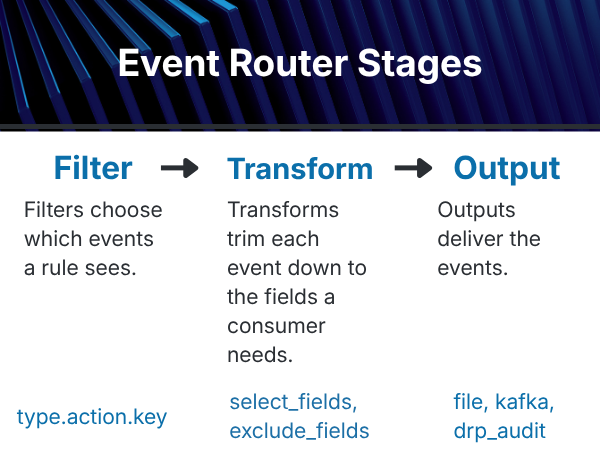
Every routed event passes through three composable stages: filter → transform → output. The next section walks through each one.
Filters, Transforms, and Outputs
The three stages compose end to end, all configured by a single event-router/event-fto parameter. A rule’s filter decides what gets in, its transform decides what each event looks like, and the shared output block decides where the events are routed.
Filters choose which events a rule sees. The base syntax is a three-part type.action.key match, with * as a wildcard and a comma-separated list allowed on the action. And(…), Re(…), and Ne(…) predicates extend the match to specific event fields when finer control is needed.
Transforms trim each event down to the fields a consumer actually needs. select_fields keeps only
the fields you name; exclude_fields drops the fields you name. Both use dot notation for nested objects.
Outputs deliver the events. file writes rotating JSON logs and is the recommended path into platforms with a native forwarding agent. kafka publishes to brokers and topics for streaming integrations. drp_audit writes into DRP’s audit_entries store in the platform’s event stream.
A discovery tool for four different audiences
The same mechanism serves four very different jobs.
Security. A filter that selects user-attributed events and strips out DRP’s internal websocket and
connection housekeeping produces a clean trail of who-did-what across the platform: the signal a security team actually wants, without the noise it doesn’t.
Compliance. For update events, DRP computes an RFC 6902 JSON Patch between the original and new state. Routed into the drp_audit destination, that becomes a per-field diff stored as a first-class DRP object, governed by DRP’s existing RBAC. SOC 2, ISO 27001, and FedRAMP reviewers can be granted
read access to audit_entries the same way you grant access to any other object, with no new auth surface and no new credential to rotate.
Operations. A rule scoped to machines.create,update,delete.* with a transform that keeps only Time, Action, Key, Principal, and Object.Name produces a compact lifecycle feed suitable for dashboards, alerting, or operational forensics. The file destination here is the recommended path into Splunk, Elastic, Kafka, or Vector: write to a local file, and let the platform’s native forwarding agent handle TLS, retries, backpressure, and credential rotation. Concerns Event Router intentionally keeps out of scope.
Debugging. Because configuration lives as a DRP parameter (event-router/event-fto) and changes take effect live without a service restart, a developer chasing a specific bug can drop in a narrow filter (say, machines.*.abc-123-def), capture exactly the events touching that object for a few minutes, and remove the rule when done. The same plugin that runs the production audit feed doubles as an ad-hoc tracing tool.
Getting started
Event Router ships as a standard DRP content pack. Install the plugin, configure the event-router/event-fto parameter on an endpoint, and routed events start flowing immediately. Start broad to discover what’s there, then narrow the filters until each rule produces a stream that genuinely answers a question someone on your team is asking.
Event Router in v4.16 is how teams turn DRP’s event stream into something a downstream consumer can put to effective use.
About the author
Luke Jarymowycz is a software architect at RackN, where he focuses on bare metal infrastructure provisioning and automation at scale. He has more than a decade of experience in IT Operations.