
VMware renewals rarely fail because teams choose the wrong strategy. Teams renew because time runs out.
Many enterprises renew VMware after pilots stall, risks surface, and operations teams hit failure modes they cannot control. Day 0 installs fail. Day 1 rebuilds drift. Leaders protect uptime and avoid disruption. Continuity wins.
Feature gaps rarely stop migrations. Operational readiness does. VMware environments evolved to tolerate inconsistency. Teams rely on manual fixes, undocumented hardware differences, and one-off workflows. When teams pilot OpenShift Virtualization, KVM-based stacks, or cloud migrations, those weaknesses surface fast. Hardware inconsistency appears. Provisioning breaks. Rebuilds fail to repeat.
A Springboard for Operational Improvement
A VMware renewal should not end modernization. It should start infrastructure correction. The renewal window gives teams space to enforce process control, automate lifecycle work, and remove operational debt.
Teams that act during this window extract more value from VMware today and regain control over when and how they change platforms tomorrow.
Why the “Great VMware Exit” Never Happened
Analysts and pundits predicted a mass VMware exit. Enterprises moved more carefully, instead. We saw a lot of attention on the licensing changes, and worried about the future of feature growth. Those discussions didn’t translate to a mass exodus.
Why?
Teams did not abandon migration because they lacked intent. They stopped when pilots exposed risks they could not absorb. Alternative platforms demand consistency. VMware absorbed inconsistency for years.
What consistently broke pilots
- Day 0 installs failed due to BIOS, firmware, or network mismatches
- Day 1 rebuilds behaved differently across nodes
- Rollbacks required manual cleanup
- Hardware inconsistency invalidated test results
When pilots fail without warning, leaders respond fast. They renew. Renewal limits damage. It preserves uptime. It buys time.
This pattern explains VMware’s durability. Alternatives work. Most environments are not ready to run them safely.
The Renewal Trap: Why Pressure Keeps Repeating on Ops Teams
Many VMware ops teams repeat the same cycle every renewal. They delay cleanup, lean on existing playbooks and manual rebuilds, and accept drift as normal.
When the next renewal arrives, urgency returns. Once we lift the immediate pressure of a renewal deadline, it can be hard to convince leadership to invest in transformation. This is influenced a lot by a sunk cost fallacy. The pressure feels external, while the underlying cause is likely internal. Unchanged processes recreate lock-in even when teams want change.
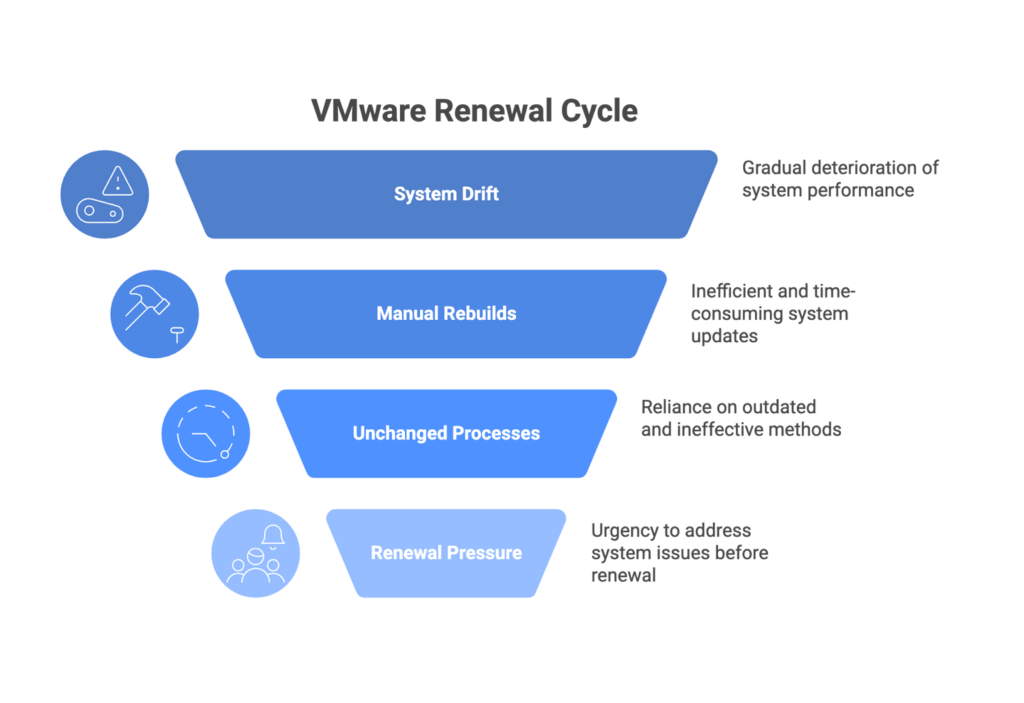
A VMware renewal should act as a process check, not a reset. The period after renewal often provides the only safe window to improve systems without risking production stability.
The Hidden Risk: Infrastructure Debt VMware Has Been Hiding
VMware licensing cost dominates renewal discussions. Cost hides the real issue. Migration failures rarely come from licensing. They come from brittle processes that are only discovered over time.
Most VMware environments carry the same hidden debt:
- Manual hardware lifecycle management
- Inconsistent cluster rebuilds
- BIOS and firmware inconsistency
- Custom scripts no one maintains
VMware tolerated these conditions. Kubernetes-based platforms do not. Migration exposes the debt VMware concealed. Certain operational issues may remain hidden until they start affecting performance.
| VMware Operational Issue | Visible Symptom | Real Impact |
| Manual rebuilds | Slow recovery | High operational risk |
| Hardware drift | Inconsistent performance | Failed pilots |
| Vendor-specific tuning | Fragile installs | Lock-in by accident |
| No lifecycle automation | High toil | Low confidence |
Until teams fix these basics, migrations will stall regardless of platform choice.
Why Automate, Renew & Improve Beats Rip & Replace
VMware renewal does not block progress, however, a rushed replacement does.
Forced Migrations Increase Risk First
Teams that rush replacement carry weak foundations into new platforms. Hardware inconsistency appears immediately. Manual rebuilds break. Hidden dependencies surface. Pilots fail before value appears.
Improving VMware Operations Pays Off Now
Teams can stabilize what they already run. Better process control inside VMware reduces outages. Standard rebuilds shorten recovery. Automation removes manual work. Confidence returns across operations teams.
Operational Maturity Preserves Choice
When infrastructure behaves predictably, urgency fades. Teams pilot VMware alternatives on their terms. They test assumptions with repeatable results. Renewal paired with improvement delivers faster ROI now and flexibility later.
How Automation Turns Renewal into Leverage
Automation changes renewal outcomes because it shifts control back to operators.
Lifecycle automation enables:
- Predictable rebuilds
- Drift detection and correction
- Hardware abstraction across vendors
- Safe, repeatable experimentation
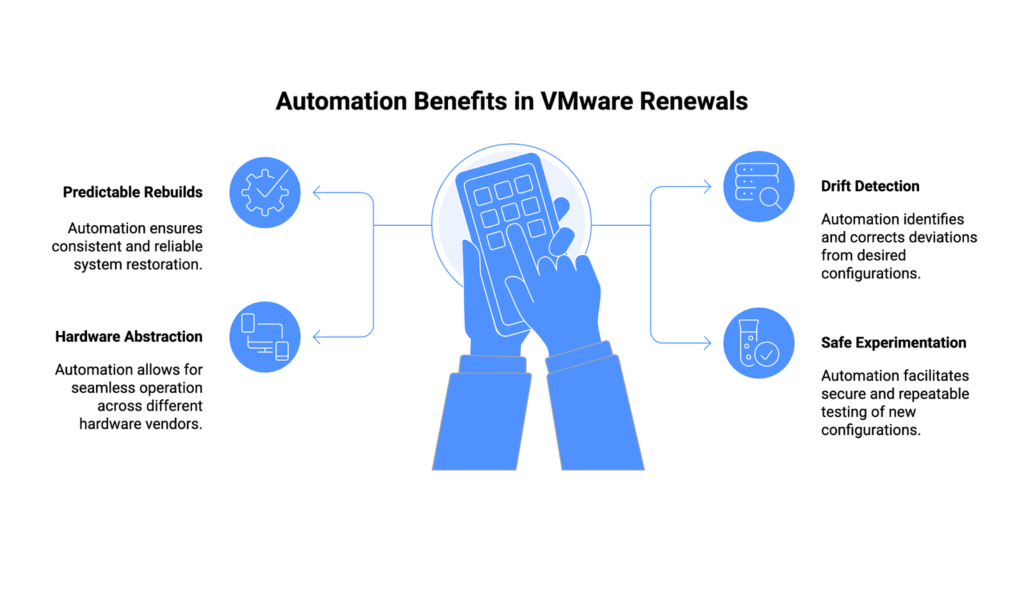
These capabilities matter in two places. In production, automation reduces cost and failure rates. In pilots, it turns experimentation into a controlled process instead of a gamble.
Automation also changes vendor conversations. Teams that can rebuild environments quickly negotiate without fear. Vendors recognize that position.
Where RackN Fits in the Improvement Cycle
To understand RackN’s value, start below the platform. Outcomes form there.
Below the Platform, Where Outcomes Are Decided
Most platform failures start with hardware inconsistency, unmanaged drift, and fragile provisioning. RackN operates at this layer. It shapes outcomes before VMware or any alternative touches infrastructure.
Establishing a Consistent Hardware Foundation
RackN Digital Rebar standardizes the hardware lifecycle first. It aligns BIOS, firmware, storage, and networking across vendors and sites. This removes the variability that destabilizes production systems and pilots.
Enabling Reliable Operations and Credible Pilots
With a consistent foundation, environments behave the same every time. VMware clusters run with less toil. Day 0 and Day 1 pilots start from known-good states. Teams rebuild repeatedly to validate behavior, performance, and recovery.
Shifting Decisions from Pressure to Evidence
As repeatability improves, urgency drops. Teams collect real data instead of reacting to failures. Platform decisions follow evidence, not deadlines. RackN does not force migration. It removes the fear that makes migration risky.
By restoring control at the infrastructure layer, RackN turns renewal from a defensive move into a deliberate strategy.
Renewal Only Fails When Nothing Changes
Renewing VMware does not signal failure. It signals risk awareness. Failure happens when teams renew and keep fragile processes, manual workflows, and infrastructure inconsistency in place. Nothing improves. Pressure returns.
Teams that use the renewal window to strengthen process control change direction. They reduce risk. They stabilize environments. Systems behave predictably because automation enforces discipline.
Operational maturity creates choice. Infrastructure stops blocking strategy and starts supporting it.
If you want the next renewal conversation to feel different, start now. Assess infrastructure readiness. Close lifecycle gaps. Enable low-risk pilots. Schedule a conversation with RackN to see how Digital Rebar helps you extract more value from VMware today while preparing for what comes next—on your terms.
FAQs
Has the VMware renewal process recently changed?
Yes, VMware’s renewal process has evolved under Broadcom’s management, with some changes in bundling and licensing terms. It’s important to review the latest renewal guidelines, as many organizations are finding the changes significant.
What happens to my virtual machines if my VMware license expires?
If your VMware license expires, your virtual machines will continue to run. You may lose access to new VMware features, support, and updates. Certain advanced features and third-party integration may become limited or unsupported.
When should I start planning to renew my organization’s VMware license?
It’s best to begin planning for VMware license renewal at least 60 to 90 days before expiration to ensure time for reviewing options, budget allocation, and potential changes in licensing. Give yourself extra time if you’re assessing the possibility of leaving VMware.
Am I going to be paying for “shelfware” in Broadcom’s new bundles?
Broadcom’s new bundles make it harder for companies to exclude unneeded components, potentially leading to ‘shelfware.’ Review the bundle contents thoroughly to determine what is necessary for your organization.
Can I still work with my existing IT partner or Managed Service Provider (MSP) for this renewal cycle?
Broadcom has significantly restructured VMware’s partner ecosystem, ending many older partner programs and shifting to a new invitation‑only model. Check with your current IT partner or MSP to find out whether this change affected them.